Smart Dock APK v1.15.0 · Latest Version for Android
Smart Dock is a desktop-mode launcher for Android with a taskbar, app menu, multi-window and keyboard shortcuts. No root required.
- Version
- 1.15.0
- Updated
- May 24, 2026
- Size
- 12 MB
- Requires
- Android 11+
- Developer
- Axel358
- Category
- Personalization
- License
- GPL-3.0
- Package
- cu.axel.smartdock
Screenshots
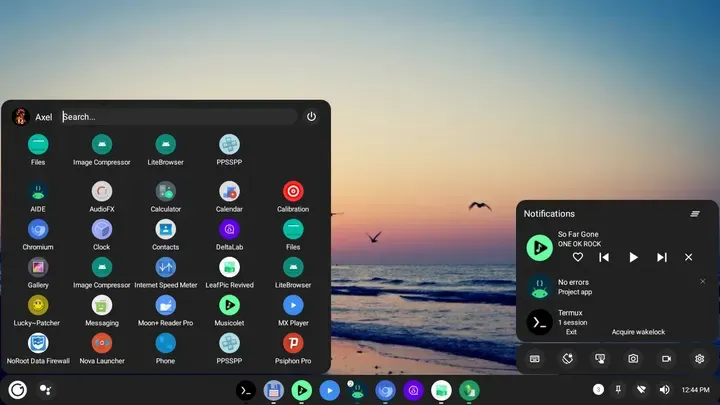
What's New in v1.15.0
- Setting to override theme transparency for the Dock
- Ability to configure Dock items per screen orientation
- Redesigned Quick settings/Notifications panel
- Improved switching between displays
- Improved apps menu loading speed and sizing
- Drop support for Android 9 and below
What is Smart Dock?
Smart Dock turns Android into a desktop-like environment with a taskbar, start menu and windowed apps. It is useful on tablets, TV boxes and phones connected to a monitor.
Key Features
- Taskbar with pinned and running apps
- Start-menu style app drawer
- Multi-window support
- Keyboard shortcuts
- Highly customizable
Getting Started
Set Smart Dock as your launcher and enable its accessibility service. Enable freeform windows in developer options for the best experience.
Open Source and Privacy
Smart Dock is developed in the open by Axel358 and released under the GPL-3.0 license. The code is hosted at github.com/axel358/smartdock, so anyone can check what the app does. The version on this page has no ads or tracking libraries flagged by F-Droid.
How to Install Smart Dock APK
- Tap Download and get the Smart Dock v1.15.0 APK (12 MB).
- Optional: compare the file’s SHA-256 checksum with the one on the download page.
- Open the file and allow your browser or file manager to install unknown apps if asked.
- Tap Install. Updates from the same source install over this one and keep your data, because they are signed with the same key.
Frequently Asked Questions
Is Smart Dock free?
Yes. Smart Dock is free and open-source software released under the GPL-3.0 license. It has no ads and no paid version is required to use it.
Is this Smart Dock APK safe?
The APK on this page is the original file published in the F-Droid repository, unmodified. Its SHA-256 checksum is listed on the download page so you can verify it, and the full source code is public.
What Android version does Smart Dock need?
Smart Dock v1.15.0 requires Android 11 or newer.
Where can I find the source code of Smart Dock?
The source code is available at https://github.com/axel358/smartdock. You can read it, report issues or contribute there.


